

AccuMail frameworks
Support
AccuMail frameworks
Import A List into AccuMail frameworks
How can I tell which addresses were matches to the Change of Address database?
How can I see the undeliverable records after address correction?
What is the difference between Address Correction and Address Correction with Move Update?
AccuMail Frameworks DPV Codes and Footnote Definitions
How can I “concatenate” fields in frameworks?
How can I export a specific group of records from my list?
Import A List into AccuMail frameworks
- To import a list into AccuMail frameworks do the following:
- Click the File menu.
- Next click Import. This will bring up the Import dialog window with two choices (Create a New Database and Append Data to the Current Database)
- Select the option that you want and click OK.
- This will bring up the Import New Database dialog window. You can browse to the file you wish to import from here.
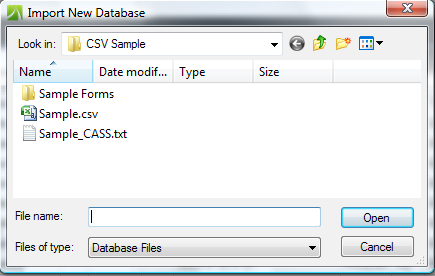
- Double click the list you want to import (Or single click the filename then single click the Open button) Next you will see the Import Text Wizard.
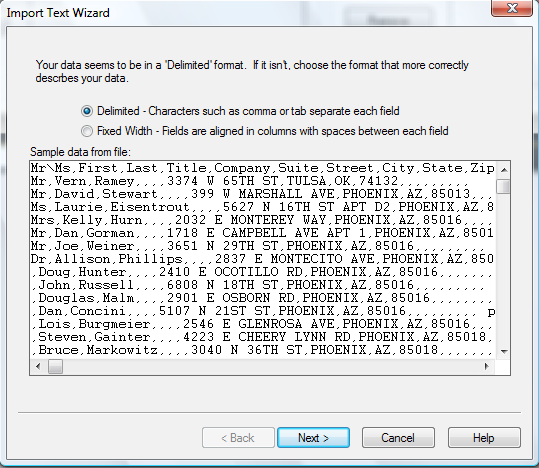
- From here you can select Delimited or Fixed Width
After selecting Delimited and Clicking Next you will be taken to the next page of the Import Text Wizard. Here you will select the delimiter that separates your fields. There is also a check box next to 'First row contains field names'.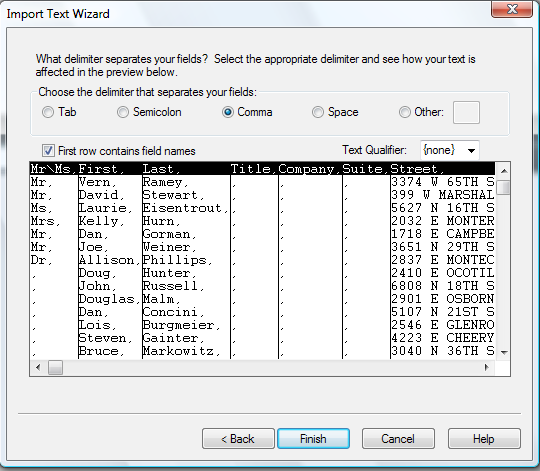
- You will want to place a check in the First row contains field names box if you want to use a header record.Next click Finish and you will then be asked where you want to save your new AccuMail frameworks database.
- Once you have selected a location and name for your database and click the Save button you will be taken to the Map Database Fields window.
- Here you can check your field maps and add additional field mappings that are not in your list.
- Once your fields are mapped click OK and now you are ready to view and process your list through CASS and NCOALink (if applicable).
Back To Top
How can I tell which addresses were matches to the Change of Address database?
After the Address Correction with Move Update task is run, there are three files that are returned for your use. (“Listname” will be the actual mailing list name of your file.)
- Listname_cassReport.pdf – This is the official CASS Certificate the USPS requires if you are mailing direct mail to customers. This shows the statistics about number of records in the list and assignments of plus4s, etc.
- Listname_ProcessingSummary.pdf – This is the official NCOALink Processing Summary report the USPS requires if you are mailing direct mail to customers. This shows the statistics about number of records in the list and the number and type of move changes made to the lis, etc.
- Listname_processingDetails.txt – This is a list of all of the records that had matches on the NCOALink database. Those addresses where the move notification is 18 months or less, will detail the old address and the moved to address (see a sample listing below).
NCOA Link Details Report
C:Program FilesDatatech SmartSoftSmartMSCustomer DataThe DirectoryNCOAOutGOME991Ba.NCOABin
06/24/09
Page 1
Original: Datatech SmartSoft Inc 5290 Overpass Rd Ste 110 Santa Barbara CA 93111-2048
Changed to: Datatech SmartSoft Inc 30101 Ste 118 Agoura Hills CA 91301-4301
Move Type: B (Business) Effective: 06/2008
Original: MITCHELL GREENE 5725 W Camino Cielo Santa Barbara CA 93105 9765
Changed to: MITCHELL GREENE 3834 Marion Ave Memphis TN 38111-6748
Move Type: I (Individual) Effective: 07/2008
Original: BEN WARRICK 821 S 2nd St Smithfield NC 27577 4369
Changed to: BEN WARRICK 132 Henley Pl Smithfield NC 27577-4358
Move Type: F (Family) Effective: 02/2009
Back To Top
How can I see the undeliverable records after address correction?
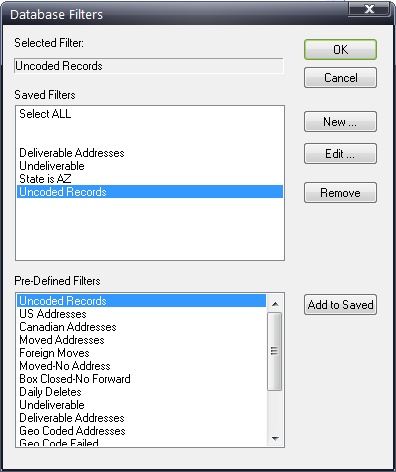
There is a Pre-Defined filter that you can select. Click on the  icon. Under Pre-Defined filters, select Uncoded records or Undeliverable, click Add to Saved button and then select it from the Saved filters and click ok.
Back To Top
What is the difference between Address Correction and Address Correction with Move Update?
Address Correction will validate and standardize your addresses as they are. Address elements are standardized and Plus4s are assigned to addresses that fit the criteria.
Address Correction with Move Update will validate and standardize your addresses and additionally check the validated addresses against the National Change of Address database to determine if any people or businesses have submitted a change of address to the Post Office so that new addresses are placed in the address field if a match to the COA database is made.
Back To Top
Is there a way to determine what changes were made to an address during validation or why a particular address was not given a plus4?
The
following is a complete list of error and warning codes that could be
attached to a record when you validate it. Even if a record is
determined to be a good address, if any components of the address were
altered or added, a warning code will be attached to the record. If the
record is undeliverable, an error code will be attached to the record.
These codes are put into the field called “Results”. To see these
codes, your list must have a field mapped to “Results”.
AccuMail
Frameworks can detect up to forty different kinds of errors when
checking an address. A single address will often have multiple errors.
Each kind of error is identified by a number or letter as shown in the
following list.
Result Code Meaning
Blank Address has been successfully coded
1 The address is coded but undeliverable (i.e. on side of street known to contain no houses
2 The zip code was not found and the city and state cannot be used to determine a geographical area to search
3 Coding would result in changing both ZIP and city. This is prohibited for PO Boxes route type addresses
4 The best match would result in too many suspicious changes
5 The street was identified as an alias but was out of the range restricted for that alias
6 No street address was given.
7 There are no street name matches in the given Zip Code or in any geographically-related Zip Code
8 The street name contain superfluous components which cannot be discarded with confidence
9 The house number could not be matched
10 The best match was made to a ZipMove record but was not an exact match
11 A ZipMove match was made but no exact match could be found in the new zip
12 The Early Warning System indicates that an exact match will become available in the next database update
13 There are multiple matches with the same degree of confidence. This may indicate an inconsistency in the USPS database
14 Incorrect suffix, directional, street name, or unit resulted in multiple matches with the same degree of confidence
15 Incorrect Zip code, city, or urbanization resulted in multiple matches with the same degree of confidence
16 A corrected field was too long to fit into the supplied field
17 Media error. The database could not be read because of a hardware or system problem
Correction Code Meaning
A Normal Street match
B PO Box match
C Route type match
D Unique Zip match
E Small Town match
F Alias match
G Highrise alternate match
H Firm match
I Highrise match
J Highrise default match
K Route default match
L Street name corrected
M Street suffix corrected
N Pre-directional corrected
O Post-directional corrected
P City corrected
Q State corrected
R Zip corrected
S Urbanization corrected
T Zip+4 corrected
U House number corrected
V Unit number corrected
W Secondary unit designator corrected
X Firm corrected
Y Street swapped with firm
Z Street swapped with alternate
0 Dual address changed to PO Box
1 Dual address street match
2 Input city is not preferred but acceptable
3 Street standardized
4 Unit not verified
5 Leftovers found
6 ZipMove match
7 LACSLINK match
Back To Top
AccuMail Frameworks DPV Codes and Footnote Definitions
In order to see the following data, your list must have two additional fields mapped to DPV and Footnotes.
The DPV field consists of three characters and returns information in the following format:
A) DPV Match Indicator (First position in field):
Blank Address was not assigned a Zip+4 and therefore no DPV processing was performed.
Y Address was DPV confirmed for both primary and (if present) secondary numbers.
D Address was DPV confirmed for primary number only, and Secondary number information was missing.
S Address was DPV confirmed for primary number only, and Secondary number information was present but unconfirmed.
N Both Primary and (if present) Secondary number information failed to DPV Confirm. (These are non-deliverable records)
B) DPV CMRA (Commercial Mail Receiving Agency) Indicator (Second position in field):
Blank Address was not assigned a Zip+4 and therefore no DPV processing was performed.
Y Address was found in CMRA table.
N Address was not found in CMRA table.
C) DPV False Positive Indicator (Third position in field):
Blank Address was not assigned a Zip+4 and therefore no DPV processing was performed.
Y Address was found in False Positive table.
N Address was not found in False Positive table.
The Footnotes field returns additional DPV information about the address. These codes are defined as follows:
AA Input address matched to ZIP+4 file.
A1 Input address not matched to Zip+4 file.
BB Input address matched to DPV (all components).
CC Input address primary number matched to DPV but secondary number not matched (present but not valid).
N1 Input address primary number matched to DPV but high-rise address missing secondary number.
M1 Input address primary number missing.
M3 Input address prmary number invalid.
P1 Input address missing PO, RR, or HC Box number.
RR Input address matched to Commercial Mail Receiving Agency (CMRA).
R1 Input address matched to CMRA but secondary number not present.
U1 Input zip is a Unique zip code.
Back To Top
Why are mail pieces returned as undeliverable by the post office after running them through NCOALink?
There are several reasons why mail may be returned to the sender after running through the NCOALink process.
a) It is important to know that the NCOALink returns two types of matches. The first is COA or address changes made within the last 18 months. These result in new addresses. The second is ANK records which are addresses that are identified as being moves from the prior 19-48 months. It is known that these addresses are bad and should be removed from the mailing list. Returned pieces may include ANK records
b) CASS rules allow an assignment of a plus4 to a highrise building level (i.e. an apartment building). NCOALink matches require an apartment level match. It is possible to have an address certify to the building without an apartment number, but then no match is found because the apartment number is missing , so no new address is matched.
c) NCOALink vendors have only the NCOALink database from which to discover new addresses. The post office has additional sources (such as previous neighbors) who may supply changes of address.
d) Some mailing lists may have very old data (such as a high school reunion list), where the addresses may be over 48 months old. The NCOALink database has records that are no more than 48 months old so the old address is no longer in the NCOALINK database for a match to be made.
e) While individual names do not have to be exact to be matched, if a mailing list uses a nickname (i.e. Sunshine Williams), and the NCOALINK database has a given name (Suzanne Williams), it is possible for a match to not be made.
f) Finally, since the NCOALINK database is made and maintained by people, the possibility of errors exists.
Back To Top
Why are mailpieces being returned as undeliverable by the USPS even after running them through NCOALink?
There are several reasons why mail may be returned to the sender after running through the NCOALink process.
a) It is important to know that the NCOALink returns two types of matches. The first is COA or address changes made within the last 18 months. These result in new addresses. The second is ANK records which are addresses that are identified as being moves from the prior 19-48 months. It is known that these addresses are bad and should be removed from the mailing list. Returned pieces may include ANK records
b) CASS rules allow an assignment of a plus4 to a high rise building level (i.e. an apartment building). NCOALink matches require an apartment level match. It is possible to have an address certify to the building without an apartment number, but then no match is found because the apartment number is missing, so no new address is matched.
c) NCOALink vendors have only the NCOALink database from which to discover new addresses. The post office has additional sources (such as previous neighbors) who may supply changes of address.
d) Some mailing lists may have very old data (such as a high school reunion list), where the addresses may be over 48 months old. The NCOALink database has records that are no more than 48 months old so the old address is no longer in the NCOALink database for a match to be made.
e) While individual names do not have to be exact to be matched, if a mailing list uses a nickname (i.e. Sunshine Williams), and the NCOALink database has a given name (Suzanne Williams), it is possible for a match to not be made.
f) Finally, since the NCOALink database is made and maintained by people, the possibility of errors exists.
Back To Top
How can I “concatenate” fields in frameworks?
The adding of multiple fields into a single field is done in the Batch function. For example, the address information is separated into several fields: HouseNum, PreDirectional, Street, and Suffix. The Post Office needs the data to be in a single field. To combine these different fields into the field Street, follow these steps.
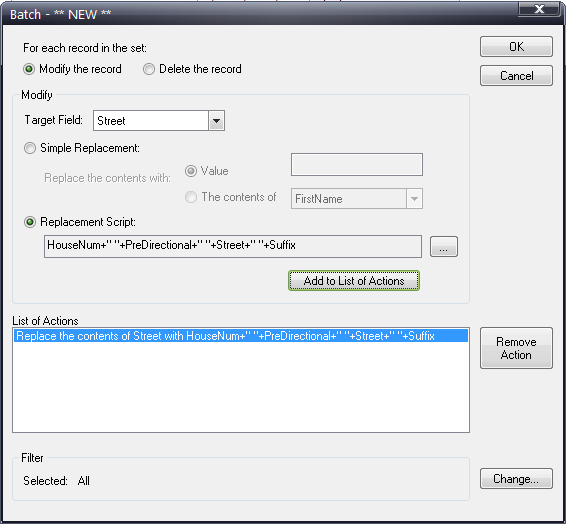
Click on the  icon. This opens the Batch Operations screen. Click New. This opens the **NEW ** screen where the concatenation command is written.
1. Select the Modify the record radio button.
2. Select the Target field, in this case, the Street field.
3. Select the Replacement Script radio button.
4. The replacement Script Builder screen is where we build our replacement script. Select the HouseNum field and click add field. Be sure to check Add space between fields. Add all the desired fields
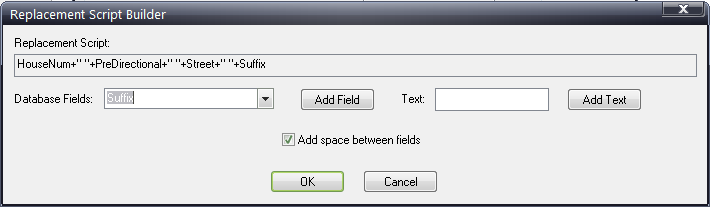
5. Click Ok and then click Add to List of Actions on the **NEW** screen. Then click OK.
6. At the prompt, name this particular script and click OK.
7. At the Batch Operations window, select the newly saved script and click Execute! At the prompt to run, say yes.
8. Close the Batch function and the Street field will have all of the data required.
Back To Top
How can I export a specific group of records from my list?
This is a two-step process. The first step is to set a filter to find the records that match your criteria. The second is to select that subset of records and then export them.
Let’s select for all records that are in the state of AZ.
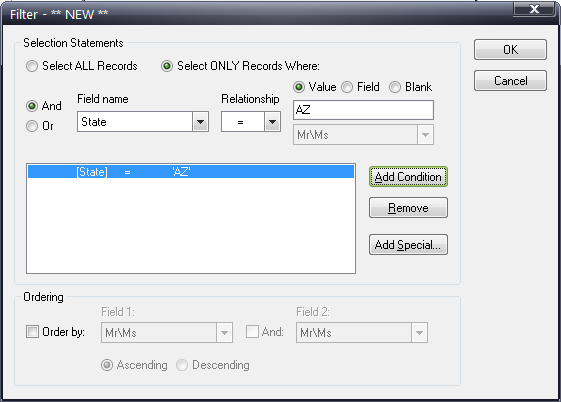
To set the filter, click on the icon. At the Database Filters screen, click New. This brings up the *** New *** filter box were you define the criteria used to find the subset of records.
1. Click on Select ONLY records Where radio button
2. Click on the AND radio button
3. Under Field name, select State
4. Select “=” under Relationship (This means “equals” )
5. Click Value radio button and enter AZ
6. Click Add Condition button
7. Click OK.
8. Name the filter at the prompt.
9. Select the new filter from the list of Database Filters and Click OK.
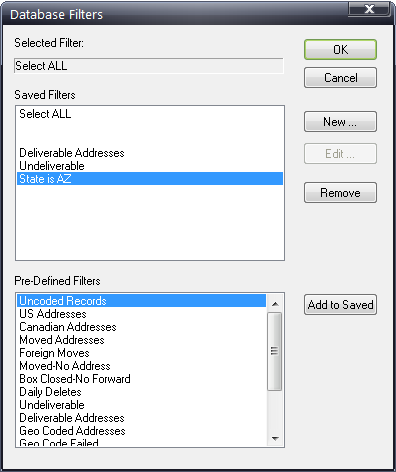
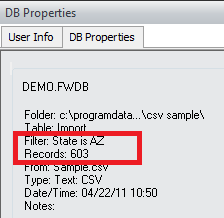
The resulting list of records will be the subset of records. Under the DB Properties window, the active filter will be displayed as well as the number of records that match the criteria set for the filter.
The second step is to Export these records. Be sure the correct filter is set and then click on the Database List task. Click Export. Select which export options you want. Then click Export again. The Export Complete screen will verify the number of records exported so you can be sure you had the correct subset of data selected for exporting.